Cut the filler.
Keep the flow.
Kill the Fill finds every um, uh, er, you know, hesitation and dead pause in your talking-head video and removes them in minutes — hours of timeline scrubbing, gone. Render a clean video with upload-ready captions, or hand the cuts straight to Final Cut, Premiere or Resolve as an editable timeline. 100% on your Mac.
Free trial: 3 exports, unlimited previews — no account, no card · Lifetime $29: pay once, 1 year of updates, 14-day money-back
🔒 100% on-device — your footage never leaves your Mac · Works offline · Apple Silicon native
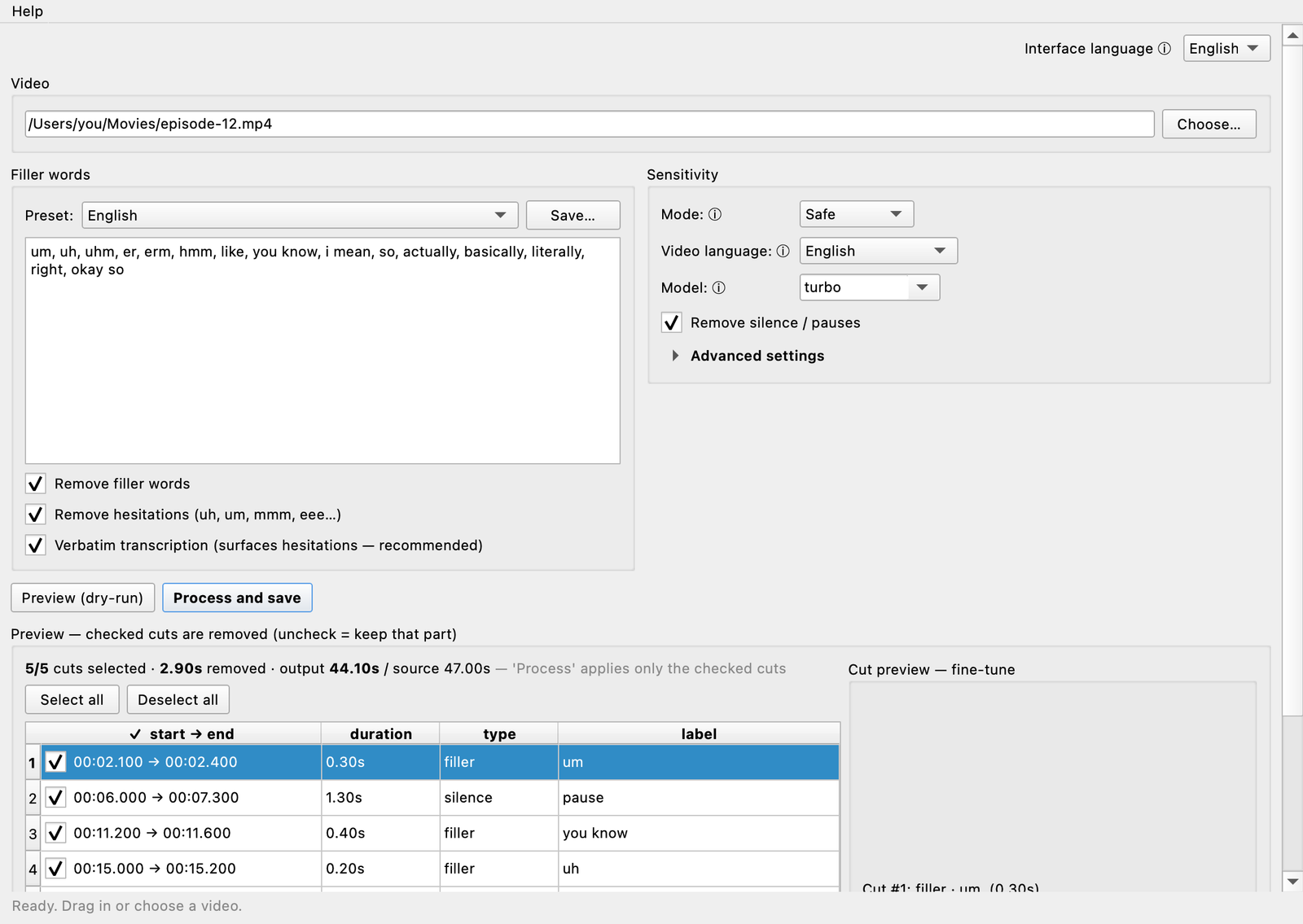
Tedious edits, done in seconds
Your fillers, your list
Everyone's verbal tics are different. Edit the word list freely — add your crutch words and catchphrases, in any of 90+ languages, and the app cuts exactly those.
100% on your Mac
Transcription and editing run fully on-device. Your footage never touches a cloud.
You approve every cut
Preview the list, listen to any cut, fine-tune the boundaries — then render in perfect sync.
Cut. Caption. Hand off to your timeline.
Editable timeline export
Not just a rendered file: export the approved cut plan as Final Cut Pro (FCPXML), Adobe Premiere XML or EDL. Every cut lands on your timeline as separate clips — you keep the final say, nothing is baked in.
Captions included
SRT / WebVTT subtitles generated for the cleaned video — timing already shifted, the ums gone from the captions too. Upload-ready.
Silence-only turbo
Skip transcription and strip dead air only — long videos analyse in seconds. Plus a shareable "fillers killed" report after every render.
The old way vs. Kill the Fill
✗ The old way
Scrub the whole timeline by ear.
Cut every “um” by hand — 50+ cuts.
Nudge each clip so audio stays in sync.
1–3 hours per video.
✓ With Kill the Fill
Drop in the file, press Preview.
Every filler & silence found for you.
Untick what you want to keep, press Process.
Done in minutes, perfectly in sync.
One price. Yours forever.
- Lifetime license — pay once, no subscription
- 1 year of updates included (in-app update check)
- All your own Macs
- Timeline export: Final Cut · Premiere · Resolve
- License key shown instantly at checkout
- 14-day money-back guarantee
Secure checkout by Stripe · Card & Apple Pay
Good to know
Is there a free trial?
Yes — download and use it free: unlimited previews (see every cut, listen, fine-tune) and 3 full exports. After that, a $29 lifetime license unlocks unlimited exports.
How do I get my license?
Instantly — the key appears right on the confirmation page the second you pay, and a copy is e-mailed to you. Paste it into the app under Help → Enter license.
Can I define my own filler words?
Yes — that's the point. The filler list is fully editable: add your personal crutch words ("sort of", "right?", your catchphrase), save them as presets, and reuse them per language or per show.
Does it really work offline?
Yes — speech recognition and editing happen entirely on your Mac. No upload, no account.
Which Macs?
Apple Silicon (M1 or newer), macOS 11+.
What does "1 year of updates" mean?
The app is yours forever. You also get every update released in the 12 months after purchase, free. Major future versions may be a paid upgrade.
Refunds?
14 days, no questions asked — just reply to your purchase e-mail.